My computing setup for 2026
Published: in 72be40e
Updated: in b1e378a
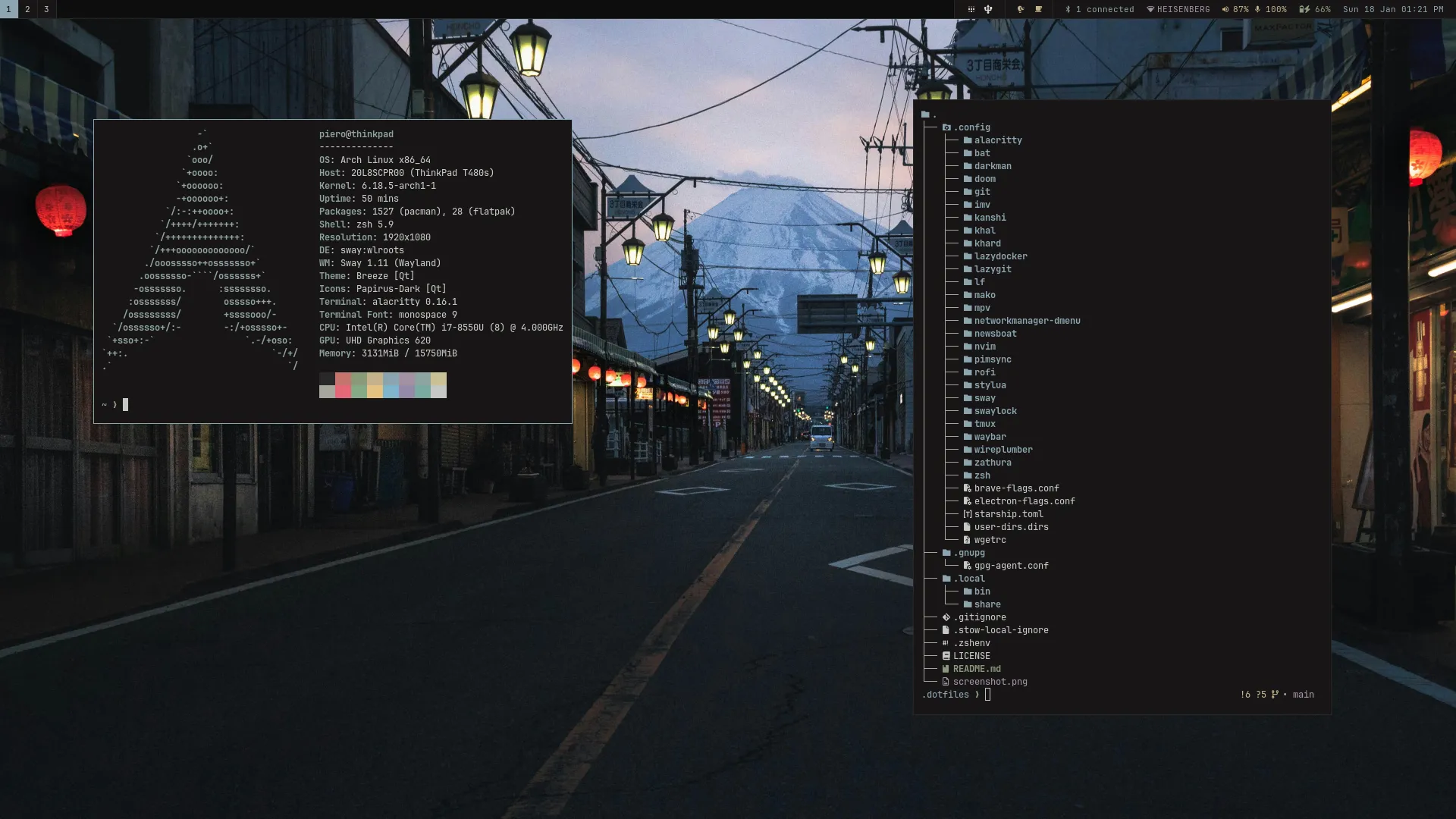
This is a walkthrough of my current setup. I have a /uses page where I keep a list of some of the tools I
use. However, I thought doing a deep dive of my current setup would be a good thing to do as my first post for the year.
Basics
Let’s start with the basics. My main computer is a ThinkPad T480s running Arch Linux. I’ve been using Arch for almost 4 years. My current installation is almost 2 years since I changed my laptop at the start of 2024.
Arch meets all my needs. I have a system that is almost always up-to-date. The documentation is second to none. If a package is not available in the official repositories I will probably find it in the AUR. I wouldn’t want to use another distribution for the time being.
Window manager
Instead of using a full desktop environment like GNOME or KDE Plasma, I use Sway, a tiling window manager and Wayland compositor. It has been my window manager of choice since I switched from GNOME. I’ve tried other compositors like Hyprland, but Sway works well, so I haven’t had the need to switch.
I don’t do much ricing but when I started using Sway I did tinker with a bunch of configurations until I settled on what I have now. Likewise, I try to stick to the default keybindings most of the time. I might change this in the future in order to make the setup easier to use with my Corne keyboard.
Status Bar
I use Waybar for the status bar. I’ve tried to keep my
configuration as simple as possible. I
only have one custom module used to display if wlsunset is running. More on
this tool later.
Launcher
I use rofi as a launcher. When making custom
scripts I stick with the dmenu mode. I do this just in
case I want to try another launcher since most of them have a mode compatible with dmenu.
I use networkmanager-dmenu and dmenu-bluetooth for easy access to Wi-Fi and Bluetooth configurations.
So far, I haven’t had the need to switch launchers. However, Vicinae looks like something I would like to try.
Audio
I’ve been using PipeWire and WirePlumber since I started using Linux. Volume levels for both audio inputs and outputs are controlled by keybindings configured in Sway. I have also built volume-notify, a small program to display notifications whenever volume levels change.
Whenever I need more control I use wiremix and qpwgraph.
Power
I use TLP to optimize battery usage. I also wrote a custom program called battery-notify to remind me to plug in my laptop when the battery is running out.
Browsers
Firefox is my main browser. Mainly out of habit although I really like multi-account containers. I use it to compartmentalize how I browse the web. The only extensions I currently use are uBlock Origin and Surfingkeys.
I keep Chromium and Brave installed for web development. They are nice to have if I want to try features that are not yet available in Firefox.
Terminal
Most of my work is done in the terminal. I use Alacritty alongside tmux.
When it comes to tmux, I mostly stick to the default keybindings. I’ve set my prefix to Ctrl + Space because it feels better on the hands.
Shell
I use zsh. I don’t use any framework like Oh My Zsh. I only use starship as my prompt and rely on tools like fzf and zoxide for easy navigation.
Text editor
My text editor of choice is Neovim. I use it for everything that involves editing files. That includes writing code, taking notes, doing some plain text accounting, among other things.
I use a moderate amount of plugins, my setup is pretty stable, and I can do productive work in many programming languages. One thing I haven’t added is any AI integration. That’s something I might try in the following months.
When it comes to other options, I’ve tried Emacs. However, it never stuck with me. I would like to give it a try again but the effort to configure and learn a new editor is not something I’d like to spend my time on at the moment. Maybe in a few months I can get some free time to try Emacs again. I do like orgmode though. I’m currently trying out a port for Neovim.
Screen ergonomics
I used to use dark mode exclusively. However, I work outdoors from time to time and dark mode is a pain for these
situations, so I use darkman to switch between light and dark mode.
I also use wlsunset to adjust the screen temperature. It works automatically
depending on the time of the day, and it’s almost always on when I’m using dark mode.
Everything else
I’ll try to do some more writing for specific parts of my setup and how they relate to my work as a developer. If you find any of this interesting feel free to browse my dotfiles repo. Everything I didn’t mention here can probably be found there.